The Best Online Whiteboard Tools for Brainstorming and Creative Work
Compare online whiteboard tools for brainstorming, visual planning, and creative projects. Discover how AI-powered canvases like Grein help you develop ideas with spatial AI.
Langford Quarshie
· 9 min read
Ideas rarely develop in a straight line.
You might start with a reference image, add a few notes, discover an interesting connection, and then take the project in a completely different direction. For designers, filmmakers, photographers, researchers, and other creative thinkers, this process is a natural part of doing the work.
That is why online whiteboard tools have become useful for brainstorming, visual planning, collaboration, and organizing ideas. They give you a flexible space to bring information together without having to organize everything into a document or presentation first.
But a new category of tools is taking this further: AI-powered whiteboards that help you develop ideas, not just organize them.
In this guide, we'll explore what to look for in an online whiteboard, how AI changes the brainstorming process, and why spatial AI makes tools like Grein different.
What Is an Online Whiteboard?
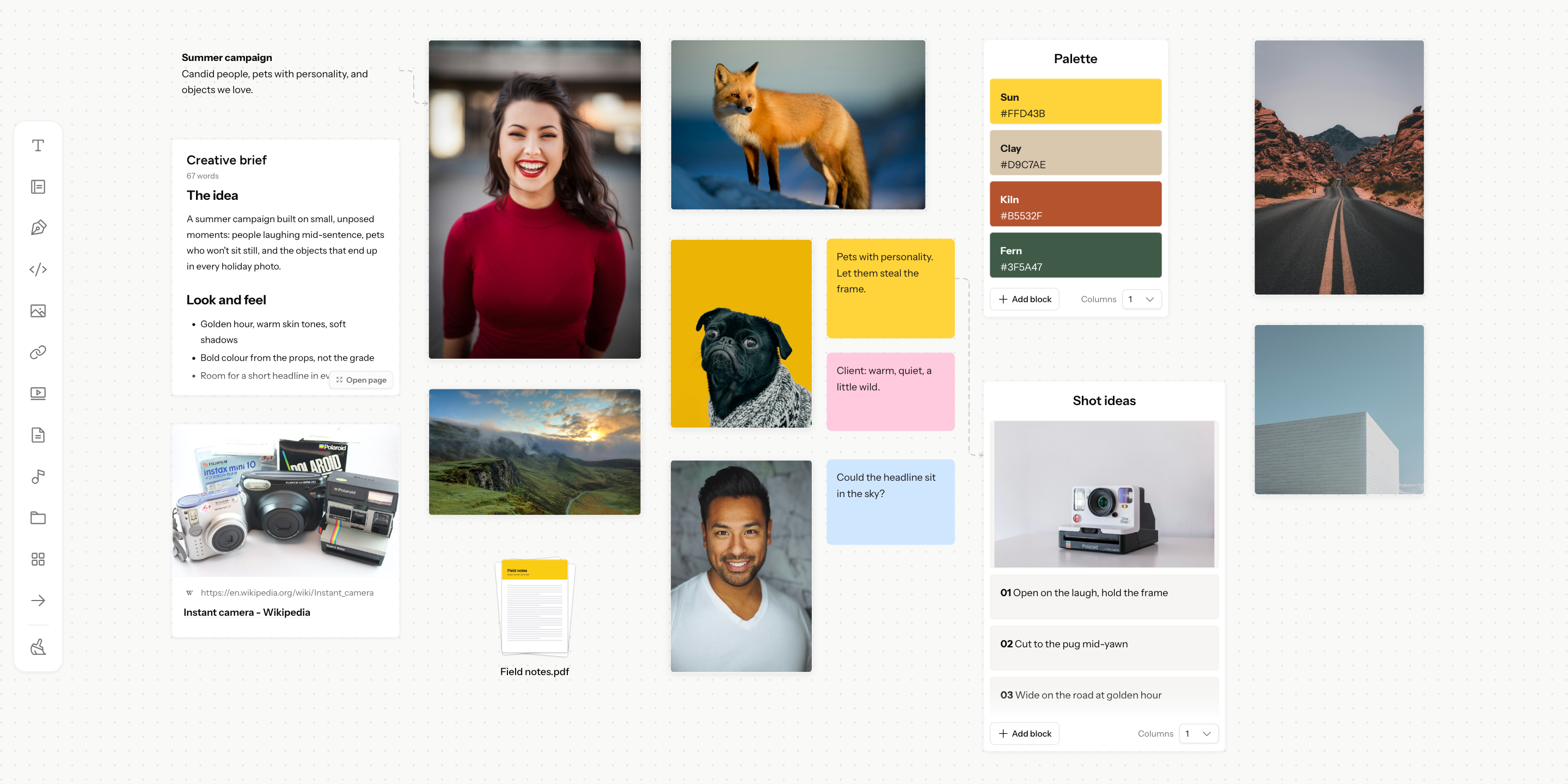
An online whiteboard is a digital workspace where you can place, arrange, and connect different types of content on a flexible canvas.
Unlike a traditional document, which usually follows a linear structure, a whiteboard lets you position ideas wherever they make sense. You can start with a central concept, branch into related thoughts, collect references around a theme, and rearrange everything as your understanding evolves.
Depending on the tool, your canvas might contain:
- Text notes and ideas
- Images and visual references
- Website links and research
- Videos and other media
- Diagrams, sketches, and mind maps
- Documents and project materials
Online whiteboards are useful for brainstorming sessions, moodboards, project planning, research, storyboarding, workshops, and team collaboration.
The best tool depends on what you're trying to accomplish. A team planning a product launch may need structured collaboration, while a photographer developing a visual concept may care more about references, image organization, and creative exploration.
What to Look for in an Online Whiteboard Tool
Not every whiteboard is designed for the same kind of work. Before choosing one, consider how you actually develop your ideas.
1. A flexible, infinite canvas
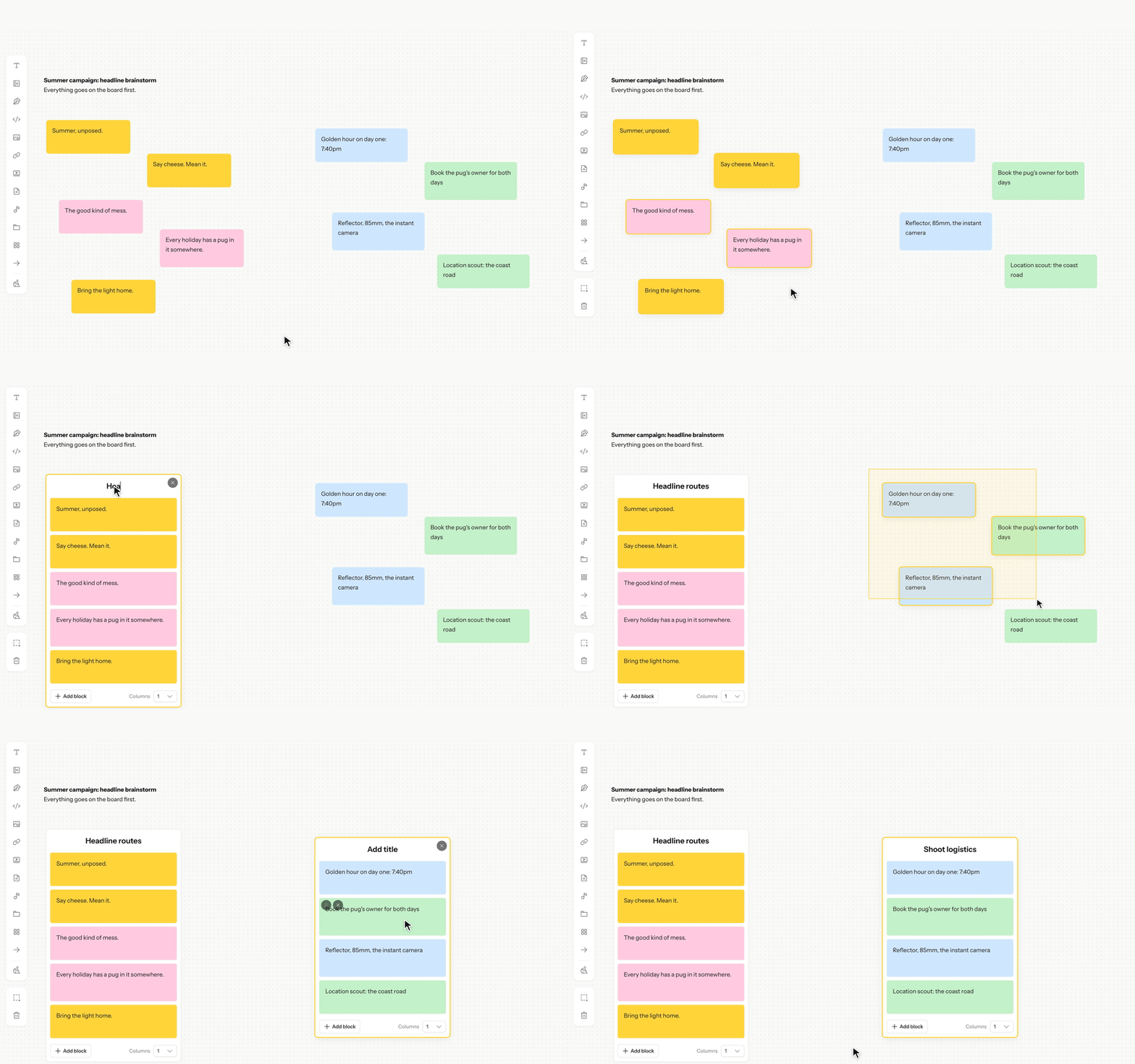
A good visual workspace should give you room to think without forcing every idea into a predefined layout.
An infinite canvas lets you expand a project as new questions, references, and possibilities emerge. You can create separate areas for different themes, connect related ideas, and reorganize the workspace as your thinking develops.
This is particularly useful for creative projects where the final structure isn't obvious at the beginning.
2. Support for different types of content
Ideas rarely exist in one format. A design concept might involve screenshots, typography references, color palettes, links, and written notes. A film project might involve scene references, video clips, scripts, and shot lists.
A useful whiteboard should let you bring relevant material together instead of scattering it across multiple applications.
3. Easy brainstorming and organization
Collecting material is only the first step. You also need to make sense of it.
Look for tools that let you group related ideas, create sections, rearrange content, and move between broad exploration and more focused planning.
The aim isn't to create a perfectly organized board immediately. It's to make it easier to understand what you've collected and decide what to do with it.
4. Collaboration and sharing
If you work with clients, collaborators, or students, sharing matters.
A whiteboard can become a place to present visual directions, gather feedback, explain a concept, or work through a problem together. Depending on the tool, you may also be able to share a public link or collaborate in real time.
5. AI that understands your work
Many AI tools are good at answering questions or generating text, but brainstorming often requires more context than a single prompt can provide.
Imagine asking an AI assistant to review your moodboard, compare the references you've collected, identify a visual theme, or help reorganize your ideas.
For that workflow, the important question is not simply whether a whiteboard has AI. It's whether the AI can understand the material on your canvas and help you work with it.
Traditional Whiteboards vs. AI-Powered Canvases
A traditional digital whiteboard helps you organize and explore ideas visually. An AI-powered canvas can add another layer by helping you interpret and develop those ideas.
For example, imagine you're preparing a moodboard for a new brand identity.
With a traditional whiteboard, you collect visual references, arrange images, add notes, and discuss the direction with your team.
With an AI-powered canvas, you can also ask questions about the material, explore alternative directions, summarize your thinking, or get help developing the concept.
The difference becomes more significant when the AI can work with the canvas itself.
Instead of copying information into a separate chat window and manually transferring the response back, you can work within the context of the project you're already developing.
This is where spatial AI becomes interesting.
What Is Spatial AI?
Spatial AI, in the context of a visual workspace, means AI that can work with information in the context of a visual canvas.
It isn't limited to the text in your latest message. It can take into account the material and arrangement of ideas on the board, helping it understand what you're working on and how different elements relate to one another.
Depending on the capabilities of the tool, this can mean helping you interpret a collection of references, connect related ideas, organize content, or make changes directly to your workspace.
Consider a practical example.
You're developing a campaign concept. Your canvas contains product photography references, a few video links, notes about the target audience, and several possible creative directions.
You could ask a conventional chatbot for campaign ideas, but you'd need to explain the project and provide the relevant context.
With spatial AI, the canvas itself becomes part of the conversation. The AI can use the material you've assembled to help you explore the project and, where supported, take action on the canvas.
Your workspace becomes more than a place to store information. It becomes part of the way you think through the work.
Meet Grein: An AI-Powered Infinite Canvas
Grein is an infinite AI whiteboard canvas designed for brainstorming, research, visual planning, and developing ideas.
You can bring together images, videos, links, notes, documents, and other supported content on a single canvas. Arrange your material freely, build moodboards, explore different directions, and develop your projects as your thinking evolves.
What makes Grein particularly interesting is its approach to AI.
AI that can see your canvas
Grein's AI can use the visual context of your board to understand what you're working on. Instead of treating every question as an isolated prompt, it can help you work through ideas in the context of your project.
For example, you might collect a set of references for a photography shoot and ask for help identifying a consistent visual direction. Or you could organize research around a product idea and ask the AI to help explore the next steps.
The canvas provides context for the conversation.
AI that can work on your canvas
Grein's AI isn't limited to giving you suggestions in a chat window. It can also perform supported actions on your canvas, helping you turn ideas into changes in your workspace.
That could mean using AI to help organize or develop the material you're working with, rather than manually translating every suggestion into a separate action.
This distinction matters because creative work involves both thinking and doing. The less friction there is between exploring an idea and developing it, the easier it becomes to keep moving.
A workspace for visual and written thinking
Creative projects aren't made of images alone.
Grein lets you combine visual references with notes, links, documents, and longer-form writing. This makes it possible to keep the research, context, and thinking behind a project alongside its visual direction.
You can build a moodboard, collect research, develop a concept, and continue working through the project without treating each stage as an entirely separate activity.
Search for creative references
Finding the right reference can be as important as organizing the references you already have.
Grein includes in-canvas media search capabilities that help you find visual and audio inspiration as part of your workflow. Rather than relying entirely on material you've already collected, you can bring additional inspiration into your workspace as your ideas develop.
Connect your AI workflow
Grein also supports integrations with external AI assistants, including Claude and ChatGPT through its MCP integration.
This gives you another way to work with your Grein projects through supported AI clients, rather than limiting your workflow to one assistant.
You can explore the available capabilities and connections on the Grein integrations page.
How Creatives Can Use an AI Whiteboard
The value of an AI-powered canvas becomes clearer when you look at how different people work.
For designers: Build moodboards and explore brand directions
Collect references for typography, color, composition, imagery, and visual identity. Arrange them into moodboards, compare possible directions, and use AI to help explore the concepts behind the visuals.
This is especially useful during the early stages of a branding or web design project, when the goal is to develop and communicate a clear direction before committing to the final design.
For photographers: Plan shoots and build shot lists
Bring together lighting references, composition ideas, location inspiration, and notes about the shoot. Use the canvas to develop the visual concept and organize the shots you want to capture.
AI can help you explore alternative approaches and develop ideas while keeping the relevant references in context.
For filmmakers: Develop storyboards and visual concepts
Organize scene references, video inspiration, scripts, and shot ideas on one canvas. Explore the mood and visual language of a film before moving into production.
An AI assistant that can work with your project context can help you investigate scenes, consider alternatives, and develop the ideas behind the storyboard.
For AI image and video creators: Organize references and prompts
Bring together style references, prompts, images, and generated media. Use your canvas to establish a visual direction and keep the material for a project organized.
Spatial AI adds another way to explore variations and develop the concept without separating your creative context from your brainstorming process.
For researchers and students: Connect information and ideas
Collect articles, documents, notes, and other resources around a subject. Group related material, identify questions worth exploring, and use AI to help develop your understanding.
A visual canvas is particularly useful when you're still figuring out how different pieces of information relate to one another.
Are AI Whiteboards Replacing Traditional Whiteboards?
Not necessarily. Traditional whiteboards remain useful for drawing, mapping processes, collaborating, and capturing ideas quickly.
AI-powered canvases add capabilities that can be valuable when your work requires more than capturing and arranging information.
The right choice depends on your needs:
- Choose a straightforward whiteboard if you mainly need a space to sketch ideas or map a process.
- Choose a visual planning tool if you regularly develop moodboards, collect references, or organize creative projects.
- Consider an AI-powered canvas if you want help exploring ideas in context and working with the material on your board.
You don't need AI for every task. But when you're developing a complex idea, having AI that understands your workspace can make the process more connected.
Start Thinking on a Canvas
The best brainstorming tool is one that supports the way you work.
For some projects, that's a simple whiteboard. For others, it's a moodboarding tool or a collaborative workspace. And when your work involves collecting references, exploring possibilities, and developing ideas with AI, an AI-powered canvas offers another approach.
Grein brings visual thinking and AI together in an infinite canvas where you can collect material, explore connections, and work on your ideas in context.
If you're looking for a different way to brainstorm, plan creative projects, or develop ideas with AI, give it a try.
Explore Grein for free and see what you can build on your canvas.
Written by
Langford Quarshie